Python Web Application for Log Display
- Tech Stack: Python, HTML, CSS
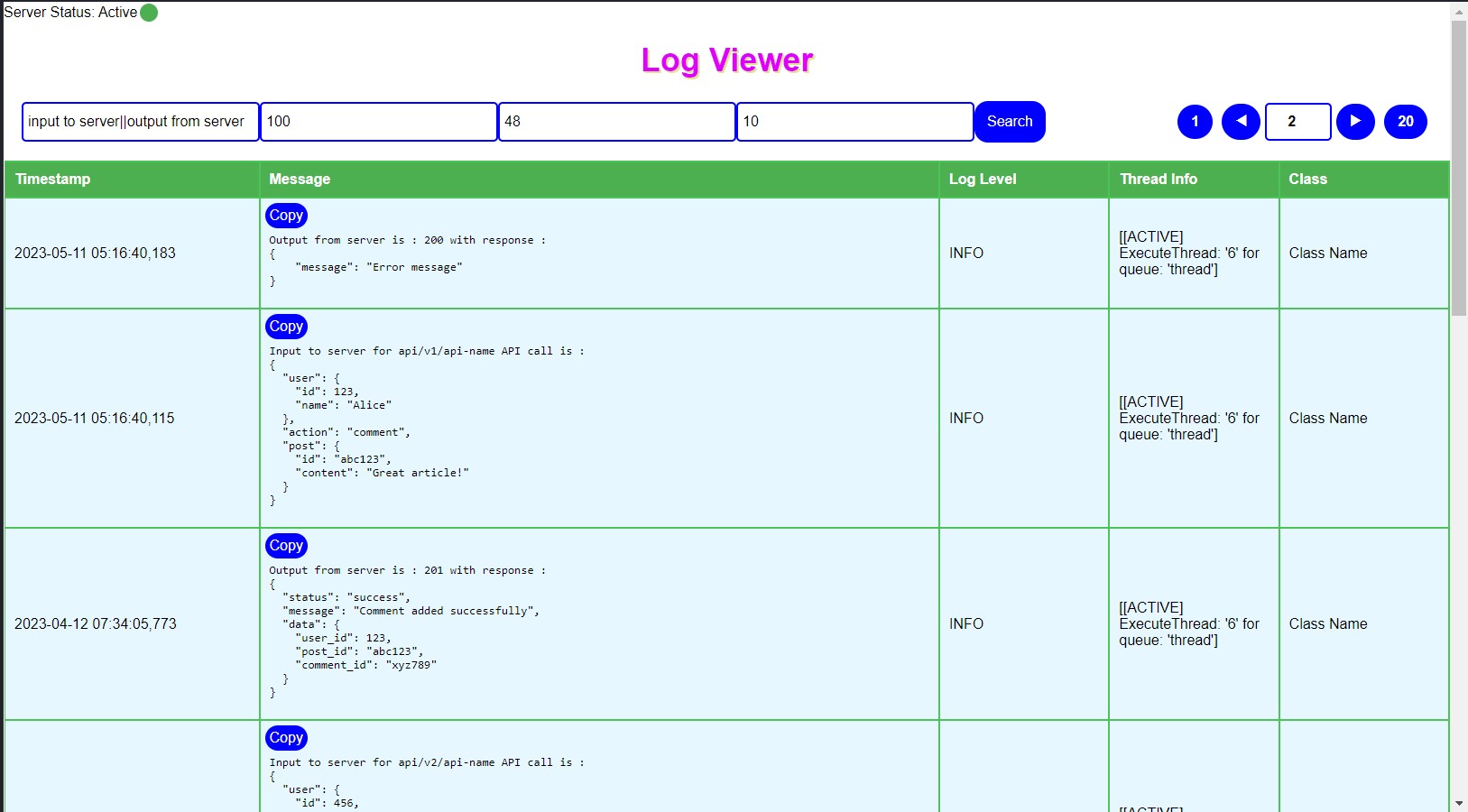
I developed a Python web application that revolutionizes log management for application servers. With this application, developers can seamlessly view logs directly in their browser without the need to login to servers. The application automatically formats JSON content for enhanced readability, simplifying the understanding of log entries.
Key Features:
- Search Functionality: Users can search for logs using single or multiple text queries separated by a delimiter '||'. This enables efficient log retrieval based on specific criteria.
- Pagination: The application supports pagination, allowing users to navigate through log entries with ease. Users can customize the number of logs displayed per page to suit their preferences.
- Time Range Filtering: Users can specify a time range to view logs from a particular period, providing insights into application behavior during specific timeframes.
- Auto-Refresh: Users can set an auto-refresh interval, and the application will automatically refresh logs at the specified interval. This ensures users always have access to the latest log data without manual intervention.
- Performance Optimization: To optimize performance, the application reads logs from files on application servers and caches them. The cache automatically updates with the latest logs and evicts old logs based on the specified time range. This approach minimizes server load and improves overall application performance.
Journey:
First basic version of this application was created which reads all the log files every time and then sends all the logs in the form of a html page without any search functionality.
- Feature-1: Added search functionality, by adding this feature developers can easily search for the desired log message. This helps in analyzing QA tickets or Integration testing.
- Feature-2: Auto refresh of logs, with this feature developers will see latest logs without refreshing again and again.
- Feature-3: Copy button in message box helps users to directly copy log message and use it for further analysis.
- Feature-4: Performance Optimization, I observed that loading all the logs at a time into a single page takes a lot of time and bandwidth so I implemented pagination feature which will show required no of logs set by user or default number of logs by doing so page loading times decreased a lot and with the help of navigation buttons or users can directly enter page number which they wanted to see and check the logs of that page.
- Feature-5: Multiple text search, users can search for multiple texts seperated by a delimiter and all the matching logs will be displayed.
- Feature-6: Json requests or responses will be formated in json format and displayed in json format which is easy to read and understand. (Request/Response is generally not formatted in log files with this it is easy to understand)
- Feature-7: Application status, with this feature if someone restarts the application all the users who are using log application will be able to see the application status whether it is Active or Inactive.
With these advanced features, my Python web application simplifies log management for users, enhancing their productivity and efficiency in monitoring application behavior.